All Resources
R-36
Technology
AI-Native Application Development
The anatomy of an application with a model inside it: retrieval over your own data, agents behind a permission boundary, evaluation before rollout, and the plumbing that decides whether it survives real traffic.
PAR2 Labs
August 21, 2026
17 min
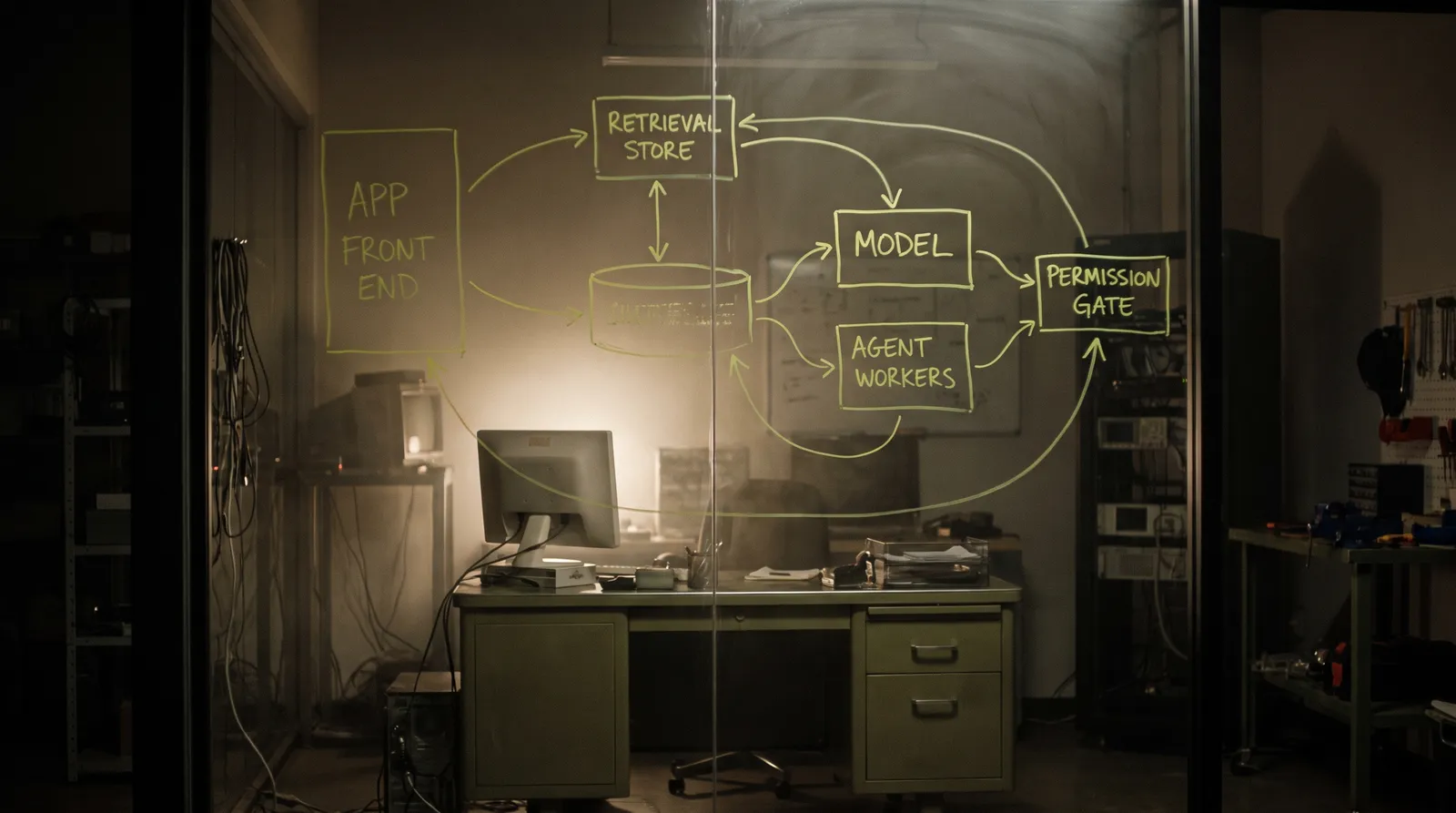
An AI-native application is not a chat box stapled to a CRUD app. The model sits inside a flow that already earns its keep, reading the company's own data and handing back something the next system can consume. That changes the architecture in four specific places — retrieval, action, evaluation, and operations — and this is what each one actually requires.
Watch the explainer
5:12
Narrated, with every diagram built on screen: the anatomy, retrieval, building it and warning signs.
01
The anatomy
Every AI feature that survives production has the same five layers underneath it. Teams that ship successfully build all five; teams that stall usually built the first and the last and hoped the middle would not matter.
Fig 2 — retrieval and guardrails are the two layers most often skipped, and they are the two that decide whether the feature is trustworthy.
02
Retrieval is a search problem before it is a model problem
Most disappointing RAG systems are disappointing because the retrieval is bad, not because the model is. If the right passage is not in the context, no amount of prompt engineering recovers it.
Chunk on structure rather than character count, embed with a model suited to your domain, and combine vector similarity with keyword search — pure vector search reliably fails on names, identifiers, error codes and rare terms, which is exactly what people search for.
| Decision | Default that works | Why the naive choice fails |
|---|---|---|
| Chunking | Split on document structure — heading, section, clause — with parent context retained | Fixed 512-character windows cut sentences in half and strand tables from their headers |
| Search | Hybrid: vector + BM25 keyword, fused | Pure vector search misses exact identifiers, SKUs and error codes |
| Reranking | Retrieve 30–50, rerank to the best 5–8 | Top-k by raw similarity puts near-duplicates in every slot |
| Citation | Return chunk ids with every answer, render them | Unciteable answers cannot be verified, so they will not be trusted |
| Freshness | Incremental reindex on write, not nightly rebuild | A stale index is worse than no index — it is confidently out of date |
← Swipe for the rest of the table →
← Drag for the rest of the table →
If the right passage is not in the context, no amount of prompt engineering will recover it.
03
Implementation path
Build in this order. Every step earlier in the list makes the later ones cheaper, and skipping evaluation until the end is the most common way a promising prototype fails to ship.
01
Pick a task with a checkable output
TOOL
Product judgement
USE
A task where correct and incorrect are distinguishable
GET
A scoped first feature
Choose something where a human can say quickly whether the output was right — drafting a reply, extracting fields from a document, classifying a ticket. Avoid open-ended assistants as a first build.
Why: If you cannot tell whether the output is correct, you cannot evaluate it, and without evaluation you cannot safely change anything later. Checkability is a prerequisite, not a nicety.
02
Build the corpus and the index
TOOL
pgvector, or a dedicated vector store
USE
Structure-aware chunking, hybrid retrieval
GET
A searchable corpus with stable ids
Ingest with structure-aware chunking, keep a stable id and source pointer per chunk, store embeddings alongside a keyword index, and reindex incrementally on write. Keep the raw source — you will re-chunk at least twice.
Why: pgvector keeps vectors next to the relational data and the permissions that already govern it, which removes a whole class of authorisation bug you would otherwise have to solve twice.
03
Retrieve wide, rerank narrow
TOOL
Hybrid search + a reranker
USE
Fuse vector and keyword results, then rerank
GET
5–8 genuinely relevant passages
Retrieve 30–50 candidates from both vector and keyword search, fuse the rankings, then rerank to the passages you will actually put in context. Log what was retrieved for every request.
Why: Context is finite and attention is not uniform across it. Eight good passages beat forty mediocre ones, and the retrieval log is the only way to diagnose a wrong answer after the fact.
04
Give the model tools, behind a permission boundary
TOOL
Structured tool use
USE
Typed tools; authorisation on the server, per call
GET
Actions the model can take safely
Define tools with schemas, execute them server-side, and authorise every call against the end user's permissions rather than a service account. Require a human confirmation step for anything irreversible or outward-facing.
Why: A tool call is an API call the model chose to make. If it runs with more authority than the user who triggered it, you have built a privilege-escalation path with a natural-language front end.
05
Build the eval set before you tune
TOOL
A golden set + a scorer
USE
50–200 real cases, including the ones that hurt
GET
A number that moves when quality moves
Collect real inputs with known-good outputs, weighted toward edge cases and past failures. Score with exact match or a rubric where the task allows, and reserve model-graded scoring for genuinely subjective outputs. Freeze the set and version it.
Why: Without an eval set, every prompt change is a vibe. With one, a change ships on evidence — and you find out that the 'obvious improvement' regressed three cases before your users do.
06
Instrument cost, latency and failure
TOOL
OpenTelemetry GenAI conventions
USE
Token counts, latency percentiles, tool errors, per trace
GET
An operable feature
Trace every request end to end: retrieval, model call, tool calls, total tokens, and the p50/p95/p99 latency. Set a per-request token budget and alert when it drifts. Attribute cost per feature, not just per month.
Why: AI features fail on cost and latency far more often than on quality. A feature nobody can afford to run at scale is not shipped, however good its outputs are.
07
Plan the degraded path
TOOL
Your own fallback logic
USE
Timeouts, retries with jitter, a smaller model, a static path
GET
A feature that fails gracefully
Decide what happens when the provider is slow, rate-limits you, or is down. Cache aggressively where inputs repeat. Fall back to a smaller model, then to a deterministic path, then to an honest message. Never leave a spinner as the failure mode.
Why: Model APIs are dependencies with their own incidents. Everything else in your stack has a degraded mode designed for it; this deserves the same treatment.
04
How to tell it is going wrong
These are the symptoms that show up before the feature is quietly abandoned. Each maps to a layer that was skipped rather than to a model that was inadequate.
Failure signatures
01
Answers are plausible but unciteable — retrieval is not returning the right passages, and no prompt will fix it.
02
Quality changes and nobody can say by how much — there is no eval set, so every change is a guess.
03
The bill scales faster than usage — no token budget, no caching, and no attribution per feature.
04
A tool ran with more authority than the user who triggered it — authorisation is on a service account, which is a privilege-escalation path.
05
Latency is fine at p50 and unusable at p95 — nobody looked past the average.
06
The provider had an incident and the feature simply hung — no timeout, no fallback, no degraded path.
05
Reference
The retrieval and evaluation reading matters more than the model documentation. Model choice is the easiest decision to change later; retrieval architecture and eval discipline are the hardest.
Primary documentation
Tool use
Typed tools, schemas, and the shape of an agentic loop.
pgvector
Vectors alongside relational data and the permissions already governing it.
LangGraph
Explicit state machines for multi-step control flow, when orchestration outgrows a function.
promptfoo
Running a golden set as a test suite, with assertions and diffs between versions.
OpenTelemetry — GenAI semantic conventions
Standard span and attribute names for model calls, tokens and tool invocations.
OWASP Cheat Sheet Series
Authorisation patterns that apply unchanged to tool execution.
Hugging Face Transformers
Embedding and reranking model choices for the retrieval layer.
Key Takeaways
01
Pick a first task whose output a human can check quickly — checkability enables everything else.
02
Retrieval is a search problem: hybrid, reranked, cited, incrementally reindexed.
03
Authorise every tool call as the end user, never as a service account.
04
Build the eval set before tuning, and instrument cost and p95 latency from day one.
PAR2 Labs · Technology
Work With Us