All Resources
R-43
Film Making
From Flat to Film-Ready: Extracting a Full CG/VFX Layer Stack from AI-Generated 4K Video
One flat AI-generated 4K clip in; depth, normals, optical flow and mattes out — a Nuke-ready layer stack, synthesised entirely on a desk-side DGX Spark with no cloud.
PAR2 Labs
August 22, 2026
12 min
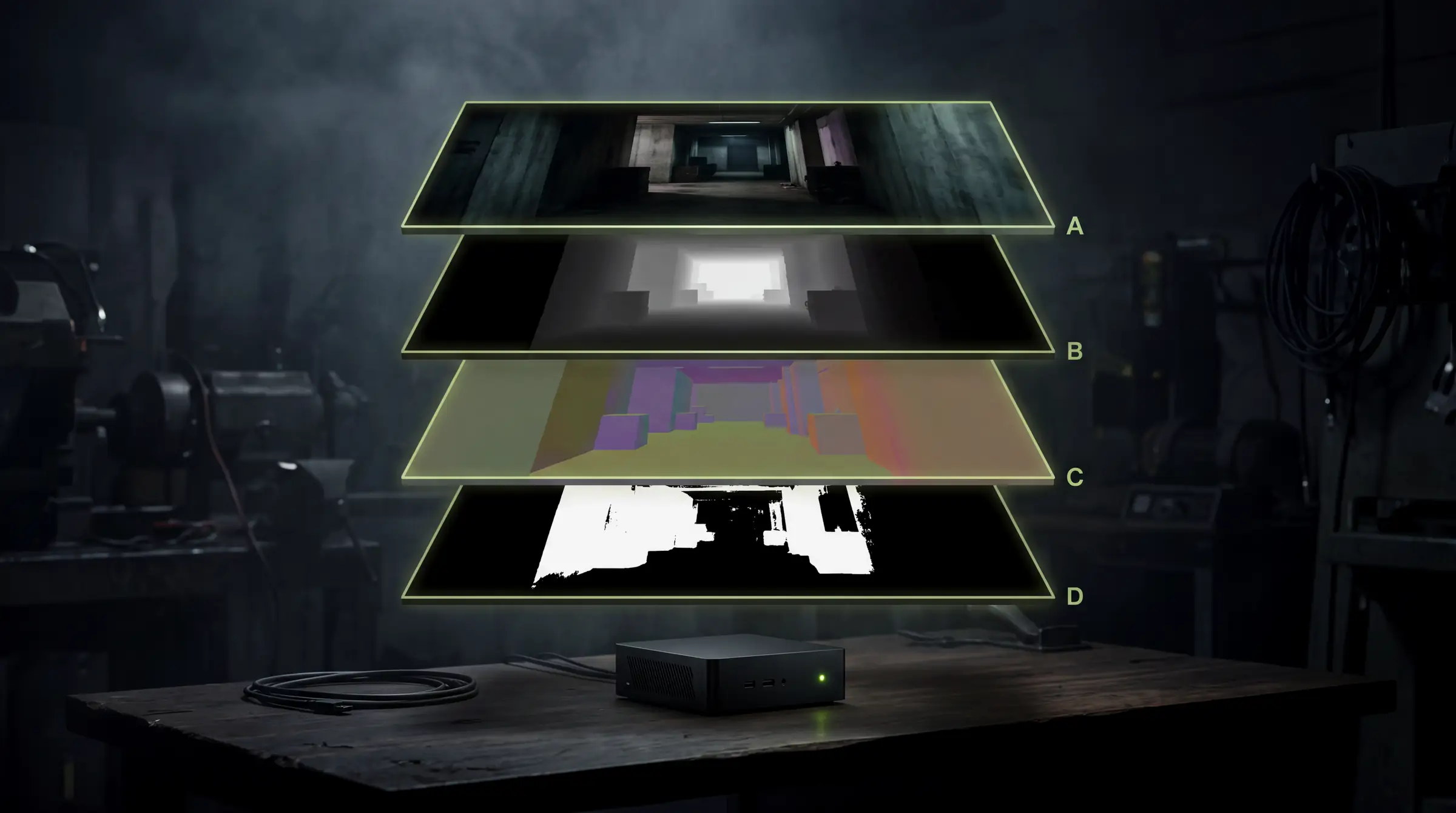
AI video generators output a flattened image — no depth pass, no camera, no mattes underneath. VFX and CG pipelines need those layers. We built an on-device pipeline on an NVIDIA DGX Spark that synthesises the missing passes with four neural models and delivers them as frame-aligned 4K OpenEXRs. One 361-frame clip in, five production layers out, roughly 47 GB, ready to drop onto a Nuke timeline.
Watch the explainer
5:10
Narrated, with every diagram built on screen: five layers from one clip, the pipeline, layer by layer and honest limits.
01
The problem: generative video is a photograph, not a render
When a renderer produces a frame, it also produces the scene behind it — a depth (Z) pass, surface normals, motion vectors, object IDs, a camera. Compositors live on those layers: depth for atmosphere and defocus, normals for relighting, motion vectors for retimes and motion blur, mattes for isolation.
An AI-generated clip has none of that. It is a flattened, graded, compressed delivery image with no geometry, no camera and no mattes underneath it. If you want to do real CG/VFX work on top of generative footage, you have to reconstruct those layers.
That is the whole game here: not recovery, but principled inference — synthesise each pass with a purpose-built model, then treat it as if it were a render output, while being honest about where inference is not measurement.
02
What we built
From one clip — 3840×2160, 10-bit 4:2:0, 24 fps, 361 frames — we produced five frame-aligned layers. Everything is numbered 001001–001361 and 1:1 frame-aligned, so all five drop onto one timeline with no conform.
| Layer | Model | Channels | What it is for |
|---|---|---|---|
| Plate | — (colour pipeline) | RGB (scene-linear) | The beauty / background |
| Depth | Video Depth Anything (ViT-L) | Z | DOF, fog, depth grades, matte assist |
| Normals | Marigold-Normals | normal.X / Y / Z | Relighting, specular reshaping |
| Optical flow | RAFT-Large | forward/backward.U/V + flow_confidence.A | Retimes, motion blur, temporal work |
| Mattes | SAM 2.1 (Hiera-Large) | A | Subject isolation, holdouts, region grades |
← Swipe for the rest of the table →
← Drag for the rest of the table →
Every EXR uses standard layer.component naming — depth.Z, normal.X, forward.U — so Nuke's Read node exposes them as pickable layers automatically.
03
The hardware: a supercomputer on the desk
The entire pipeline ran on an NVIDIA DGX Spark — a GB10 Grace-Blackwell machine with 128 GB of unified memory on an ARM64 Ubuntu 24.04 base. Two things make it the right tool.
Unified memory: 4K neural inference is memory-hungry, and 128 GB shared between CPU and GPU meant we could hold a 361-frame video session (SAM 2), a diffusion pipeline (Marigold) and an optical-flow model in memory at once — and even run two at a time. On-device: no footage leaves the building, no per-minute cloud GPU bill, and the iteration loop is a local SSH away.
04
The pipeline: order is a dependency, not a preference
The key rule is that grain and compression blocking destroy inference models, so they come out first. An edge-directed model cannot tell a compression block from real detail — clean the plate, then infer.
Fig 1 — the order is a dependency chain, not a preference. Degrain precedes deband because degraining unmasks banding that was previously hidden under noise.
Not recovery, but principled inference — synthesise each pass, then be honest about where inference is not measurement.
05
Layer by layer
Four models, each doing one job on the cleaned plate. The caveats below are stated deliberately — every one of them changes how a compositor should use the pass.
01
Depth
TOOL
Video Depth Anything (ViT-L)
USE
Video variant, not per-frame estimation
GET
Single-channel float Z
Run the video model across the whole shot rather than estimating each frame independently. Output is a single-channel float Z pass, normalised per shot.
Why: Per-frame estimation flickers, and flicker in a depth pass becomes boiling in every downstream defocus and atmosphere effect. Stated loudly: this is relative inverse depth, normalised per shot — not scene units. Superb for cueing and matte work; it is not geometry.
02
Normals
TOOL
Marigold-Normals
USE
Diffusion model estimating surface orientation directly
GET
normal.X / Y / Z in [-1, 1]
Estimate normals directly rather than differentiating the depth pass. Document the convention alongside the delivery — camera-space, +Y up.
Why: Differentiating depth amplifies noise; direct estimation does not. And a relight lit from the wrong side is almost always a flipped axis, which is why the convention goes in the README rather than in someone's head.
03
Optical flow
TOOL
RAFT-Large
USE
Forward and backward flow, per shot
GET
forward/backward.U/V + flow_confidence.A
Compute both forward and backward flow in pixels, plus a forward/backward-consistency confidence channel so compositors can gate occlusions. Run per shot.
Why: Flow across a cut is meaningless. The confidence channel is what lets a compositor trust the vectors where they agree and mask them where they do not.
04
Mattes
TOOL
SAM 2.1 (Hiera-Large)
USE
Prompt on frame 0, propagate through the shot
GET
Soft alpha A
Prompt the subject on frame 0 with a bounding box plus interior points, then let SAM 2's video model propagate the matte through all 361 frames. One prompt, tracked object, whole clip.
Why: Video propagation holds the identity of the object across the shot in a way per-frame segmentation does not, which is the difference between a matte and 361 unrelated masks.
06
The war stories
This is the part people leave out of the glossy version, and it is where the real engineering was.
W1
A locked-down network
TOOL
Sneakernet over the relay
USE
Fetch on a connected PC, push to the box
GET
Models and weights on device
The Spark could reach PyPI and Hugging Face's API, but GitHub, NVIDIA NGC and Hugging Face's weight CDN were all blocked. Model code and multi-gigabyte weights simply would not download on the box, so everything was fetched on an internet-connected PC and pushed over.
Why: Assuming the target has the same network as your laptop is the fastest way to lose a day. Establish what the box can actually reach before planning the install.
W2
Resumable chunked transfer
TOOL
64–128 MB chunks with per-chunk retry
USE
Skip-if-present, reassemble, hash-verify
GET
Transfers that finish
The only link was a Tailscale connection through a relay — flaky, dropping SSH every few minutes. A naïve 1.5 GB copy never finished. Every payload was split into 64–128 MB chunks, each transferred with retry and skip-if-already-there, then reassembled and hash-verified on the far side.
Why: A dropped chunk costs seconds instead of the whole file. Over an unreliable link, resumability is worth more than raw throughput.
W3
Half-float to halve the wire
TOOL
16-bit half EXR
USE
Convert on the Spark before transfer
GET
~50% less data over a slow link
The return trip — normals plus flow — was roughly 40 GB of float32 EXR. Converting to 16-bit half on the Spark first cut that roughly in half before it ever hit the slow link.
Why: There is no meaningful quality loss for these passes at half precision, and the transfer time saved is real. Convert where the compute is, not where the bandwidth is.
W4
Concurrent GPU orchestration
TOOL
128 GB unified memory
USE
Overlap transfer-bound and compute-bound work
GET
Two models resident at once
Depth transfer, flow inference and normals inference ran overlapping, with jobs sequenced so nothing contended for the GPU while transfers used only network and disk.
Why: The bottleneck alternates between GPU, network and disk. Scheduling against that rather than running strictly in series is where the wall-clock saving comes from.
W5
The one-line model bug
TOOL
SAM 2 video propagator
USE
start_frame_idx, and a better prompt
GET
A matte of the whole figure
SAM 2's video propagator refused to start until the prompted frame was processed first (start_frame_idx). And the first matte prompt — two centre points — segmented only the folded forearms, not the figure. Switching to a bounding box plus head, torso and lap points captured the whole seated body cleanly.
Why: Small fixes, big difference — and the kind you only find by looking at every frame rather than at a contact sheet.
07
Results
Five layers × 361 frames of 4K OpenEXR, frame-aligned, with named channels. Roughly 47 GB delivered, organised one folder per layer with a README and QC previews. Depth inference took about 350 seconds for the full clip at native 4K; mattes about five minutes, propagated across the whole shot. All verified frame by frame.
| Measure | Result |
|---|---|
| Source | 1 clip · 3840×2160 · 10-bit 4:2:0 · 24 fps · 361 frames (15 s) |
| Delivered | 5 layers × 361 frames · 4K OpenEXR · ~47 GB |
| Depth inference | ~350 s for the full clip at native 4K |
| Matte propagation | ~5 min across every frame from one prompt |
| Hardware | NVIDIA DGX Spark · GB10 Grace-Blackwell · 128 GB unified · ARM64 |
| Cloud used | None. No footage left the building |
← Swipe for the rest of the table →
← Drag for the rest of the table →
08
Honest limits
These are inferred passes on generative footage, and that combination has real edges. Say them before the artist discovers them.
Where inference is not measurement
01
Depth and normals can drift shot-to-shot and boil in motion — judge in motion, at scale, before building shots on them.
02
Generative video often has no consistent underlying camera, so a solve may not hold. Treat depth as a region selector, not geometry.
03
The 4:2:0, low-bit origin is the quality ceiling. These models reconstruct; they do not add detail that was never captured.
What it fully supports
01
Atmosphere, depth of field and depth grading driven by the Z pass.
02
Relighting and specular reshaping from the normals, with the axis convention documented.
03
Retimes, motion blur and temporal work gated by the flow confidence channel.
04
Region grading, removals, matte-driven work and 2.5D set extension — a genuine, Nuke-ready VFX layer set derived from a clip that shipped as a flat image.
09
Why it matters
Generative video is about to flood production. The teams who can reconstruct the missing layers — and do it on-device, cheaply, repeatably — turn a flat AI clip into something a real VFX pipeline can grade, relight, defocus and composite.
That is the bridge between 'AI made a nice clip' and 'AI footage in a finished film'.
The models and formats used
Video Depth Anything
The video-consistent depth model behind the Z pass — the variant that does not flicker.
Marigold
Diffusion-based monocular estimation; the normals variant used for surface orientation.
RAFT
Recurrent all-pairs field transforms — the optical-flow architecture used for forward and backward vectors.
SAM 2
Promptable segmentation with video propagation, used for the tracked matte.
OpenEXR
Multi-layer float imaging, half-float storage, and the layer.component channel naming Nuke reads.
NVIDIA DGX Spark
The GB10 unified-memory box the whole pipeline ran on.
ONNX Runtime
Where these models need porting to other inference targets.
Key Takeaways
01
Clean the plate before inference — grain and compression blocking destroy edge-directed models.
02
Use video-consistent depth, not per-frame: flicker becomes boiling in every downstream effect.
03
Depth here is relative inverse depth normalised per shot — a region selector, not geometry.
04
Package to standard layer.component names so a compositor's Read node just works.
PAR2 Labs · Film Making
Work With Us